
Moving large database schemas across environments has traditionally been one of the most time-consuming and error-prone tasks for database administrators. While the db2move utility has long been a staple for migrating table data between databases, it becomes increasingly impractical when handling massive fact tables or complex multi-schema environments.
With Db2 9.7 FP2, IBM introduced a game-changing feature — Transportable Schema — designed to dramatically simplify and speed up schema-level data movement.
What Is Schema Transport?
The Schema Transport process allows DBAs to copy entire schemas quickly and efficiently from one database to another by leveraging the database backup and restore mechanisms.
Rather than exporting and importing data using PC/IXF files (as db2move does), the transport restore recreates all schema objects and restores their data directly from a backup image into an existing target database.
In essence, schema transport moves tables, indexes, and data as-is, using native Db2 internals — minimizing downtime and human error.
How the Schema Transport Process Works
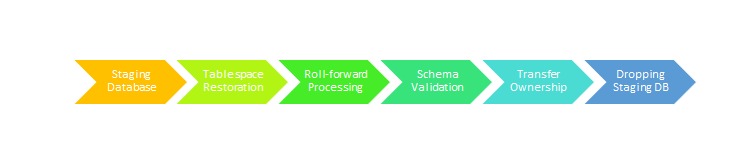
- Backup the Source Database — Create a backup image of the source database that contains the desired schema.
- Restore Using TRANSPORT Clause — Restore the schema into the target database using the TRANSPORT INTO option.
- Redirect and Map Containers — During restore, redefine tablespace containers as needed for the new environment.
- Transfer Ownership — Db2 transfers ownership of the transported tablespaces to the target database.
- Cleanup — The temporary staging database used for transport (e.g., SYSTG00x) is dropped after completion unless explicitly preserved with the STAGE IN clause.
Example:
RESTORE DATABASE tsdb TABLESPACE (TS1, TS2)
SCHEMA (MART)
FROM /home/db2inst1 TAKEN AT 20160621040041
TRANSPORT INTO ttdb REDIRECT;
After redirecting containers:
SET TABLESPACE CONTAINERS FOR 3 USING (FILE ‘/data/TS1.DAT’ 5000);
SET TABLESPACE CONTAINERS FOR 4 USING (FILE ‘/data/TS2.DAT’ 5000);
RESTORE DATABASE tsdb CONTINUE;
Once completed:
CONNECT TO ttdb;
LIST TABLESPACES;
Understanding Transportable Sets
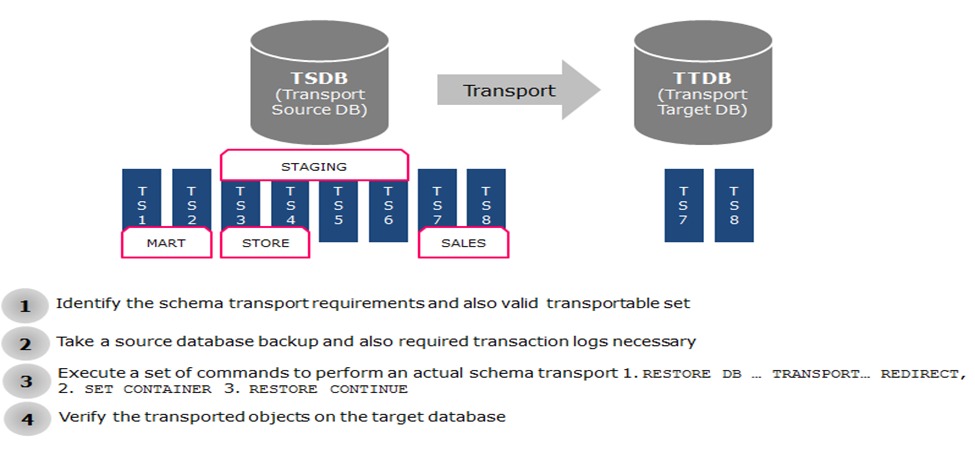
A transportable set consists of all schemas and tablespaces that have no dependencies on other schemas.
- You can transport tablespaces TS1 and TS2 with schema MART if they are self-contained.
- However, you cannot transport TS3 or TS4 if they reference objects (e.g., via foreign keys) in another schema such as STAGING.
Similarly, a set of tablespaces (TS7, TS8) and schema SALES cannot be transported if identical tablespaces or schema names already exist in the target database.
What Happens Internally
Behind the scenes, Db2 creates a temporary staging database (e.g., SYSTG001) during transport. This database extracts logical objects and replays logs (if included) to achieve transactional consistency.
Once object extraction and synchronization are complete:
- The transported tablespaces are attached to the target database.
- The staging database is automatically dropped (unless STAGE IN is used to preserve it).
Limitations and Best Practices
While Schema Transport offers tremendous performance gains, a few limitations apply:
- Entire Schema Required: Partial schema transport is not supported.
- No Shared Tablespaces: If source and target share tablespace names, transport fails (SQL2590N, RC=1).
- Not Recoverable: Transport restore operations are not recoverable since complete logs for the transported tablespaces are unavailable.
- Post-Transport Backup: Always perform a full backup on the target database after completion to ensure roll-forward recovery continuity.
Best Practice:
After a transport restore, take a full backup immediately so roll-forward operations can proceed normally from that point.
Performance Advantages
Operation | Traditional db2move | Schema Transport |
Data movement | Export/Import per table | Block-level copy |
Logging | Fully logged | Minimal logging |
Speed | Slow for large tables | 5–10x faster |
Complexity | Manual scripting | Single RESTORE command |
Dependencies | User-managed | Db2-managed consistency |
Tips for Successful Schema Transport
- Validate schema dependencies before starting.
- Ensure no overlapping schema or tablespace names exist in target.
- Use the REDIRECT option to remap storage containers efficiently.
- Monitor logs and table states after restore for consistency checks.
Final Thoughts
Db2 Schema Transport brings speed, simplicity, and reliability to an area of database administration that was once fraught with complexity. Whether you’re consolidating environments, performing data refreshes, or migrating to new infrastructure, this feature can save hours—or even days—of manual effort.
It’s one of those understated Db2 capabilities that, once adopted, quickly becomes indispensable.